Visualisation Project Summary
Derek Jacoby, derekja@uvic.ca
Problem statement:
Recorded meetings are useful, but current tools tend to provide only a timeline for navigation. Slightly better would be a timeline with speaker information. Better yet would be speaker information plus annotations. Finally, if the meeting can be segmented with respect to topics and these shown on the timeline as well then navigation through the meeting can be via whichever mechanism best suits the user's needs. For instance, users who are interested in listening only to their boss could navigate via speaker information. Those who are only interested in a particular topic can use that mechanism. And some users will still want to listen to the entire meeting or just read other users notes on the meeting if it is one that they have attended or listened to already.
Proposed solution:
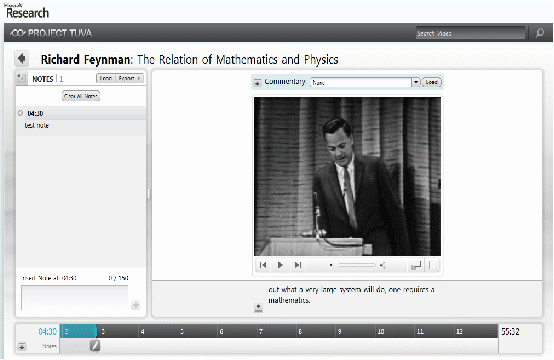
The Tuva user interface is pretty much state of the art for navigated recorded lecture material, but it does not account for multiple speakers or segmentation by topic. It is written as a silverlight application and appears as follows:
A rough first cut of my approach for a meeting browser with speakers and annotations provided appears as follows:
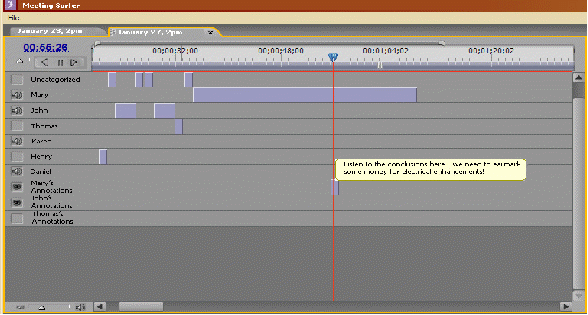
To merge these two approaches will require some redesign, of course. I would like to provide a timeline navigation area that includes facets, as see in the lifelines demo, to allow the user to hide navigation mechanisms that they are not currently interested in.
The Tuva application is written in Silverlight. This is a decent technology and one that I would like to be more familiar with, so that's where I will start. I should also add that I don't currently have access to the Silverlight source code, so I will be starting from scratch. If Silverlight proves intractable then I will likely fall back to C# as that is an environment that I am more familiar with.